In Depth Tutorial: Computing the Bayesian evidence for the Himmelblau Function
This tutorial demonstrates the basic usage of BOBE through a classic optimization problem: the Himmelblau function. This example is based on the examples/Himmelblau.py file and shows how to set up and run a Bayesian optimization loop using the BOBE framework.
The Himmelblau function is a well-known multi-modal test function in optimization that has four global minima, making it challenging for optimization algorithms. In this example, we test BOBE’s performance on this 2D function.
The Himmelblau function (in loglikelihood form) is defined as:
where
and
\(x_1, x_2 \in [-4, 4]\) and \(a = 0.1\) is a scaling factor.
By the end of this tutorial, you will understand:
How to define a likelihood function for BOBE
How to run the BOBE optimization loop
How to analyze and visualize the results
Setup and Imports
First, let’s import all the necessary libraries and set up the environment.
import os
os.environ["XLA_FLAGS"] = "--xla_force_host_platform_device_count={}".format(
    os.cpu_count()
) # for jax on cpu, set number of devices to number of cores
from BOBE import BOBE
from BOBE.utils.core import renormalise_log_weights, scale_from_unit
import time
import matplotlib.pyplot as plt
from getdist import MCSamples, plots
import numpy as np
from dynesty import DynamicNestedSampler
Define the Likelihood
Now let’s define our target function—the 2D Himmelblau function.
# Scaling factor for the Himmelblau function
afac = 0.1

def loglike(X, slow=True):
    """
    The Himmelblau log-likelihood function.

    Original form: f(x,y) = (x² + y - 11)² + (x + y² - 7)²

    Parameters:
    -----------
    X : array-like, shape (2,)
        Input parameters [x1, x2]
    slow : bool
        If True, add artificial delay (useful for testing expensive likelihoods)

    Returns:
    --------
    float : Log-likelihood value
    """
    r1 = (X[0] + X[1]**2 - 7)**2
    r2 = (X[0]**2 + X[1] - 11)**2

    if slow:
        time.sleep(4)  # Artificial delay of 4 seconds for simulating an expensive likelihood

    return -0.5 * (afac * r1 + r2)


# Problem setup
ndim = 2
param_list = ['x1', 'x2']
param_labels = ['x_1', 'x_2']
param_bounds = np.array([[-4, 4], [-4, 4]]).T  # Shape: (2, ndim)
likelihood_name = 'Himmelblau'

print("Starting BOBE run...")
Configure and Run BOBE
Now let’s set up the BOBE configuration and run the optimization. We’ll use the default WIPStd (Weighted Integrated Posterior Standard Deviation) acquisition function which is a cheap and approximate measure of \(\Delta \log Z\) (see our paper for details). When the value of this acquisition function drops below the provided logz_threshold, BOBE will start running nested sampling on the GP surrogate to get a precise estimate of the evidence and its uncertainty. If this uncertainty is below the threshold for a specified number of successive iterations, BOBE will declare convergence and stop.
start = time.time()

# Initialize BOBE instance
bobe = BOBE(
    loglikelihood=loglike,
    param_list=param_list,
    param_bounds=param_bounds,
    param_labels=param_labels,
    likelihood_name=likelihood_name, # name for saving outputs
    n_sobol_init=8,
    seed=42,
    save_dir='./results/', # directory to save results
    save=True,
)

# Run optimization with convergence and run settings
results = bobe.run(
    acq='wipstd',             # Acquisition function (default)
    min_evals=25,             # Minimum evaluations before checking convergence
    max_evals=250,            # Maximum function evaluations
    logz_threshold=0.01,      # Evidence convergence threshold
    fit_n_points=4,           # Refit GP every 4 likelihood evaluations
    batch_size=2,             # Sequential acquisition, n>1 for batch acquisition
    ns_n_points=4,            # Run nested sampling every 4 likelihood evaluations once the acquisition function reaches the logz threshold
    num_hmc_warmup=256,       # NUTS warmup steps
    num_hmc_samples=512,      # NUTS samples to draw per chain
    mc_points_size=128,       # Number of MC samples for acquisition function
    num_chains=4,             # Number of HMC chains
    convergence_n_iters=1,    # Number of successive iterations of \Delta\log Z < logz_threshold required to declare convergence
)

end = time.time()
Key Configuration Parameters
BOBE Initialization Parameters
loglikelihood: The likelihood function
param_list: List of parameter names (e.g.,
['x1', 'x2'])param_bounds: Array of shape
(2, ndim)with lower and upper bounds for each parameterparam_labels: Optional LaTeX labels for parameters (used in plots)
likelihood_name: Name used for output files
n_sobol_init: Number of initial Sobol quasi-random points to sample (8 in this example)
seed: Random seed for reproducibility
save_dir: Directory for saving results
save: Whether to save results periodically
Run Parameters
Note
Most run() parameters use dimension-based defaults that automatically scale with problem dimensionality.
You can inspect these defaults before running:
from BOBE import get_dimension_based_defaults

# For a 6-dimensional problem
defaults = get_dimension_based_defaults(ndim=6)
print(defaults)
# Output: {'min_evals': 48, 'max_evals': 1200, 'batch_size': 2, ...}
You can always override these by providing explicit values to run().
acq: Acquisition function to use (
'wipstd'is the default). WIPStd is a fast approximation of evidence uncertainty and is suited for Bayesian evidence estimation.min_evals: Minimum number of likelihood evaluations before checking convergence (25 in this example).
max_evals: Maximum number of likelihood evaluations (250 in this example).
logz_threshold: Convergence threshold for uncertainty in log evidence (0.01 in this example). Smaller values require tighter convergence. Can be relaxed to 0.5 to 1.0 for high dimensional problems.
fit_n_points: Refit GP hyperparameters after adding this many new points (4 in this example).
batch_size: Number of points to acquire per iteration (2 in this example). Standard sequential acquisition uses 1. Larger values enable batch acquisition and the likelihood evaluations can be parallelized. However, larger batch sizes (>10-20) can reduce acquisition efficiency since the GP state is not updated with the true likelihoods of all points in the batch. The update happens only after the entire batch is evaluated.
ns_n_points: Run nested sampling after adding this many new points (4 in this example).
num_hmc_warmup: Number of NUTS warmup steps for sampling the GP surrogate (256 in this example).
num_hmc_samples: Number of NUTS samples to draw per chain (512 in this example), can be increased for higher dimensions but not more than a few thousand to avoid long runtimes.
mc_points_size: Number of Monte Carlo points for WIPStd acquisition function (128 in this example). Since this is the number of points used to estimate the acquisition function, larger values give more accurate estimates but increase computation time. For higher dimensions can be set to ~500 but not more since this slows down acquisition optimization.
num_chains: Number of NUTS-HMC chains to run in parallel (defaults to 4). For jax on cpu, this can be set to the number of cores.
convergence_n_iters: Number of successive iterations meeting the threshold to declare convergence (1 in this example). Increase to avoid premature convergence in challenging problems.
Analyze the Results
Let’s examine what BOBE found and analyze the optimization process.
gp = results['gp']
logz_dict = results.get('logz', {})
likelihood = results['likelihood']
results_manager = results['results_manager']
samples = results['samples']

manual_timing = end - start

print("\n" + "="*60)
print("RUN COMPLETED")
print(f"Final LogZ: {logz_dict.get('mean', 'N/A'):.4f}")
if 'upper' in logz_dict and 'lower' in logz_dict:
    print(f"LogZ uncertainty: ±{(logz_dict['upper'] - logz_dict['lower'])/2:.4f}")

print("="*60)
print(f"Manual timing: {manual_timing:.2f} seconds ({manual_timing/60:.2f} minutes)")
Running this code should produce LogZ around -3.2 and the run should take around 3 minutes with the artificial delay on and 30-60 seconds when off.
Compare with Dynesty (Reference Method)
To validate our results, let’s compare BOBE’s evidence estimate with dynesty, a nested sampling package.
# Define the proper prior transform function for Dynesty
def prior_transform(u):
     """Map [0,1]^2 to [-4,4]^2"""
     x = np.array(u)
     return 8*x - 4

# Create Dynesty samples to compare against
dns_sampler = DynamicNestedSampler(
    loglike,
    prior_transform,
    ndim=ndim,
    sample='rwalk',
    logl_kwargs={'slow': False} # turn off artificial delay for dynesty
)

dns_sampler.run_nested(print_progress=True, dlogz_init=0.01)
res = dns_sampler.results
mean = res['logz'][-1]
logz_err = res['logzerr'][-1]
print(f"Mean logz from dynesty = {mean:.4f} +/- {logz_err:.4f}")

dns_samples = res['samples']
weights = renormalise_log_weights(res['logwt'])
The BOBE result should have excellent agreement with dynesty, demonstrating that BOBE provides accurate evidence estimates while using significantly fewer true likelihood evaluations. Internally, BOBE also uses dynesty to compute the evidence from the trained GP surrogate. Since the GP surrogate is much cheaper to evaluate compared to the true likelihood, BOBE achieves large computational savings for expensive likelihoods.
Visualize Parameter Samples and Compare
Let’s create visualizations to compare the parameter samples from BOBE and Dynesty using GetDist.
reference_samples = MCSamples(
    samples=dns_samples,
    names=param_list,
    labels=param_labels,
    weights=weights,
    ranges=dict(zip(param_list, param_bounds.T))
)

# Create MCSamples from BOBE results
sample_array = samples['x']
weights_array = samples['weights']
BOBE_Samples = MCSamples(
    samples=sample_array,
    names=param_list,
    labels=param_labels,
    weights=weights_array,
    ranges=dict(zip(param_list, param_bounds.T))
)

# Create parameter samples plot
print("Creating parameter samples plot...")
sns.set_theme('notebook', 'ticks', palette='husl')
plt.rcParams['text.usetex'] = True  # optional for LaTeX-style text rendering
plt.rcParams['font.family'] = 'serif'

g = plots.get_subplot_plotter(subplot_size=2.5, subplot_size_ratio=1)
g.settings.legend_fontsize = 16
g.settings.axes_fontsize = 16
g.settings.axes_labelsize = 16
g.triangle_plot(
    [BOBE_Samples, reference_samples],
    filled=[True, False],
    contour_colors=['#006FED', 'black'],
    contour_lws=[1, 1.5],
    legend_labels=['BOBE', 'Nested Sampler']
)

# Add scatter points for GP training data
points = scale_from_unit(gp.train_x, param_bounds)
for i in range(ndim):
    for j in range(i+1, ndim):
        ax = g.subplots[j, i]
        ax.scatter(points[:, i], points[:, j], alpha=0.75, color='red', s=4)

g.export(f'./results/{likelihood.name}_samples.pdf')
print(f"✓ Corner plot saved: ./results/{likelihood.name}_samples.pdf")
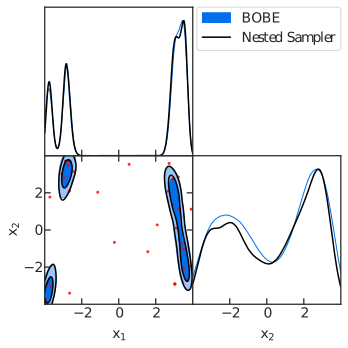
Triangle plot comparing BOBE posterior samples (blue filled contours) with Dynesty reference samples (black contours). Red scatter points show the GP training data locations. The plot demonstrates excellent agreement between BOBE and the reference nested sampler across both parameters.
Timing Analysis
Let’s analyze how the computational time was spent across different phases.
# Print timing analysis
print("DETAILED TIMING ANALYSIS")

timing_data = results_manager.get_timing_summary()

print(f"Automatic timing: {timing_data['total_runtime']:.2f} seconds ({timing_data['total_runtime']/60:.2f} minutes)")
print("Phase Breakdown:")
print("-" * 40)
for phase, time_spent in timing_data['phase_times'].items():
    if time_spent > 0:
        percentage = timing_data['percentages'].get(phase, 0)
        print(f"{phase:25s}: {time_spent:8.2f}s ({percentage:5.1f}%)")
The timing breakdown reveals (an example from a typical run):
DETAILED TIMING ANALYSIS
Automatic timing: 183.86 seconds (3.06 minutes)
Phase Breakdown:
----------------------------------------
GP Training              :     4.24s (  2.3%)
Acquisition Optimization :    14.28s (  7.8%)
True Objective Evaluations:   144.54s ( 78.6%)
Nested Sampling          :     7.99s (  4.3%)
MCMC Sampling            :    10.14s (  5.5%)
Key observations:
Acquisition Optimization (7.8%) typically takes a significant portion of the runtime (apart from the true likelihood evaluations) since it is run at every step
MCMC Sampling (5.5%) for generating posterior samples from the GP surrogate
Nested Sampling (4.3%) on the GP surrogate to compute evidence
GP Training (2.3%) is minimal due to the low dimensionality
True Objective Evaluations (78.6%) dominate due for expensive likelihoods
For expensive likelihoods (e.g., cosmological models typically taking more than 1 second per evaluation), the True Objective Evaluations would dominate, highlighting BOBE’s efficiency in minimizing these costly calls.
Plot Acquisition Values
Let’s visualize how the acquisition function values evolved during optimization.
# Plot acquisition data
acquisition_data = results_manager.get_acquisition_data()
iterations = np.array(acquisition_data['iterations'])
values = np.array(acquisition_data['values'])

fig, ax = plt.subplots(1, 1, figsize=(8, 5))
ax.plot(iterations, values, linestyle='-')
ax.set_yscale('log')
ax.set_xlabel(r'Iteration')
ax.set_ylabel(r'Acquisition Value')
plt.savefig(f"./results/{likelihood.name}_acquisition.pdf", bbox_inches='tight')
print(f"✓ Acquisition plot saved: ./results/{likelihood.name}_acquisition.pdf")
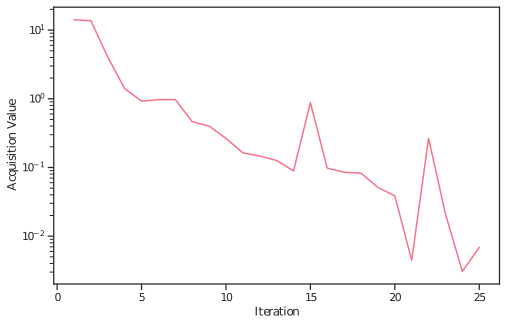
Evolution of the WIPStd acquisition function values during optimization. The acquisition value generally decreases as the GP surrogate becomes more certain about the posterior, indicating successful exploration and exploitation of the parameter space.
Summary
This tutorial demonstrated the complete workflow for using BOBE on the Himmelblau function:
Problem Setup: Defined a complicated 2D test function
BOBE Configuration: Set up the BOBE sampler, runtime settings and run the sampler
Validation: Compared against Dynesty to verify accuracy
Visualization: Created triangle plots with GetDist showing GP training points and posterior samples
Analysis: Examined timing breakdown and acquisition function evolution
Key takeaways:
BOBE is efficient: Uses significantly fewer true likelihood evaluations than traditional methods
Evidence estimation: Provides reliable Bayesian evidence estimates with uncertainty quantification
Comprehensive output: Generates detailed timing, convergence, and visualization data
Resuming a Run
To resume an interrupted run:
bobe = BOBE(
    loglikelihood=loglike,
    param_list=param_list,
    param_bounds=param_bounds,
    param_labels=param_labels,
    likelihood_name=likelihood_name,
    resume=True,
    resume_file=f'./results/{likelihood_name}', # assuming the previous run was saved here
    # ... other settings ...
)
results = bobe.run(
    # ... run settings ...
)
BOBE will automatically load the saved GP state and samples from the specified directory and continue from where it left off.
Next Steps
Explore the Cosmology example for a real-world application (ΛCDM with Planck+DESI data)
Read the User Guide (in development) for in-depth explanations of features
Check the API Reference for detailed configuration options